

Instant recognition of items happens when machines read a pattern made of lines and spaces. This visual code holds details specific to one kind of item sold or stored. A cashier, stock clerk, or automated station uses a scanner to translate the marks. Information like cost, title, and how much remains in storage appears without delay. Accuracy matters most here – mistakes drop close to zero once scanned. Speed adds up fast across thousands of transactions every day.
Table of Contents
- A Barcode – What’s That Thing Really?
- What Kind Of Barcode Fits Your Needs?
- How To Get A Barcode: Step By Step
- Price Of A Barcode?
- Where To Place Barcodes On Packaging
- Barcode Rules For Amazon Walmart And Other Stores
- Barcode Vs SKU: What’s The Difference?
- Folks Often Ask About This Part Right Here
A Barcode – What’s That Thing Really?
Selling stuff online at Amazon or walking into a big-box store like Walmart? A barcode is non-negotiable. Period. Stores scan those lines to log items into their system – no code, no listing. Tracking what’s left on shelves, handling refunds, knowing when to restock – it all runs on that little strip of black and white. Leave it out, and most shops won’t touch your product. Even now, if you’re only shipping straight to people who order from your website, things change fast once distributors get involved. The second you talk to bulk buyers or pitch to stores, someone will ask: “Where’s your barcode?” And without an answer, the conversation ends there.
Figuring out a barcode for your item? That step comes early for anyone selling goods. This walkthrough covers each part using clear, everyday words.
What Kind Of Barcode Fits Your Needs?
Some barcodes look alike but work differently. Because of how stores track items, picking the wrong type might mean shelves won’t accept your product. Imagine trying to fit a square peg in a round hole – that is what happens when formats mismatch. A quick breakdown shows why each kind matters

How To Get A Barcode: Step By Step
Step 1: Start by figuring out the number of barcodes required
Start by counting how many distinct items you have. Each version – by size, shade, taste, or setup – needs its very own code. Take mugs: one in blue, another in red – they’re counted separately. Same goes for bottles; 250ml versus 500ml means two different entries.
Start by listing every product you currently sell. After that, think about how many different items you might introduce over the following twenty-four months. The reason this helps lies in how GS1 sets its costs – prices shift depending on how many codes your business uses. Sometimes it saves money to pick a bigger range now instead of adding on more later, since expanding can mean extra charges when it comes time to renew.
Step 2: Choose between GS1 and a free barcode generator
Right here, the choice carries real weight – one that trips up plenty of newcomers. Mistakes stick because this step shapes everything after.
A single organization handles GS1 barcodes – GS1 itself – setting rules for how items get recognized across countries. Each code stands alone on Earth, never duplicated between different goods. Major stores like Walmart, Target, and Amazon won’t accept anything else at their doors. When moving large quantities of goods across borders or selling in bulk, these codes become necessary tools.
Most times, those free tools just make pictures of codes without securing an official ID. Though they spit out numbers, someone else might already own that sequence worldwide. A match with another item in a store’s database means trouble – your product could vanish from shelves or mix up with a rival’s. Retail giants like Amazon say plainly: unless it comes from GS1, it won’t go live on their platform. Confusion grows fast when duplicates sneak through backdoors.
Here’s what matters most. Free tools work okay inside your own operation – think warehouse tags, bin markers, paperwork that stays in-house. But when it comes to anything heading outside? Like items sold at stores, shipped to distributors, or handed to another company? Stay away. Those barcodes might cause trouble later on.
Step 3 : Create a GS1 Account and Register
Start at gs1us.org when you’re in the United States; otherwise, track down your country’s GS1 office. Once there, set up a profile. Choose a plan based on how many codes you plan to use.
After registration, GS1 gives you a special number sequence called a company prefix. Starting every one of your product codes, it marks ownership clearly. Found at the front each time, this string ensures global recognition. Uniqueness across markets comes from this identifier alone. Tracing back to your firm happens because of its consistent use.
Step 4 : Get Your Global Trade Item Number
Every barcode holds a real ID called a GTIN. With your GS1 prefix in hand, one by one, each product gets its own code made from that prefix, a distinct number just for it, then topped off with a math-based digit at the end.
Once your account works, GS1’s site has what you need to build GTINs. Their online system lets you add items to a public list – known as GEPIR – so stores can find details when they search by code.
A single item has its own code, while twelve packed together carry another. Each version ties to how the goods are boxed up. What fits in your hand isn’t tagged like what stacks on a pallet.
Step 5 : Generate Barcode Image
Start by turning your GTIN into a barcode picture. Inside your account page, GS1 provides a built-in tool that builds barcodes. Another path? Try trusted design programs made for visuals. Some apps specialize only in generating codes – those work too.
Start with the right measurements if you want the barcode to work properly. This kind of code – UPC-A – needs exact dimensions: usually 1.469 inches across and 1.02 inches high. People who handle printing or package layout generally know this standard well. For best results, save the file using the sharpest quality available, never less than 300 dots per inch when meant for physical copies.
Step 6 : Grab paper, hit print – slide the sheet right onto the box
Placement of the barcode changes everything, just like its existence. Scanners used by stores expect certain positioning:
- Folded spots won’t work – keep labels where they lie smooth. Curved edges bend the lines too much. Seams pull the pattern out of shape. Scanners need clean, even ground to read each stripe right.
- White bars against dark backgrounds? Only if your store says yes. Otherwise, stick to black on light. Flip that combo without permission? Not allowed.
- Start wide. Leave empty space all around the barcode like a border. This calm area must stay clear. On each side, measure nine times the skinniest black line. That gap sets the smallest allowed buffer for UPC-A labels. Empty edges keep scanners reading right.
- Smaller than 80 percent? That causes scanning problems. Stay at least that big – anything less and the scanner might not read it. Size matters here, always aim for full strength. Too tiny means trouble catching a clean signal.
- Start by testing a scan before printing on shiny or bumpy surfaces. Sometimes the texture throws off results – better safe than sorry. A quick trial run shows how ink behaves where light hits odd angles. Skip surprises later by checking early. What looks smooth to touch might still cause hiccups underneath. Always preview when working with anything that glimmers or feels uneven.
Tracking barcodes becomes tricky when handling many SKUs with different package types. With OrderIT , inventory details and ordering info stay linked to each barcode without manual effort. Mistakes fade into the background when systems handle updates silently.
Step 7 : Check the barcode works properly prior to dispatch
Start by scanning each barcode – no matter how small the shipment. Just because it looks right doesn’t mean it reads correctly. Before anything moves toward a store, depot, or storage spot, check every code yourself. Trust isn’t enough here; proof is what matters.
Start by grabbing a barcode scanner app – plenty of them cost nothing, whether you’re on an iPhone or using an Android device. Or maybe reach out to your maker or the company printing your packaging, have them do a check instead. What happens during that check is specific: a real barcode verifier steps in, measuring how well the barcode prints based on things like darkness levels, sharpness along the edges, and overall clarity of the pattern.
Start by checking if the store you’re shipping to uses a supplier website or setup steps. Maybe they’ll agree to run a trial scan on one box ahead of the whole delivery. Spotting a faulty barcode early? That skips delays later. Fix it at the start, avoid bigger trouble down the road.
Price Of A Barcode?
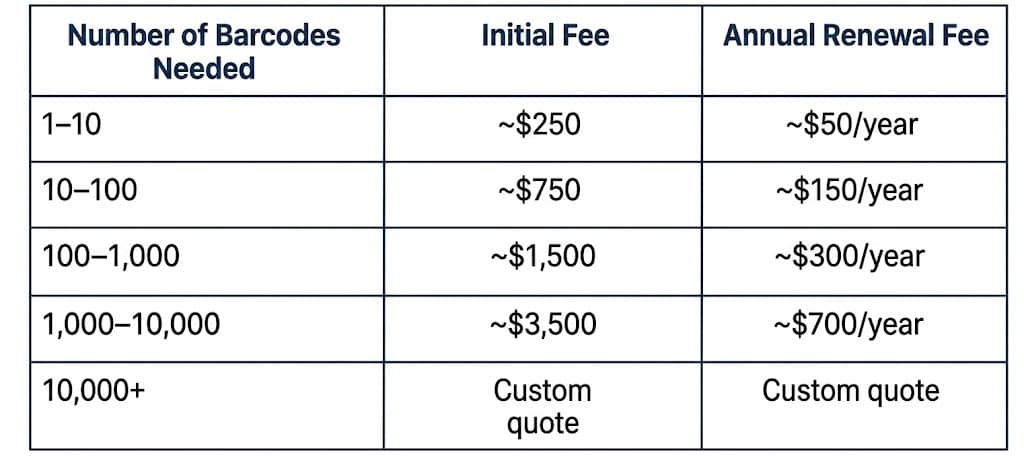
Pricing details sit here, ready for display. A clear layout holds each piece in place. Numbers appear beside labels, lined up neatly. Information stays grouped by type, nothing spills over. Each row stands on its own, easy to scan. Columns align without gaps. Text remains simple, no extra words get in the way. White space gives room to breathe. Every value matches its category exactly. No clutter hides what matters
Pricing shifts depending on your product count. A business’s prefix length sets its GTIN capacity – that range shapes what you pay.
Check gs1us.org for today’s numbers – pricing by GS1 US in 2026 might shift. Rates listed here are rough estimates only
Key points to understand
- Every year, GS1 asks for a payment to keep your company prefix active. Without paying, barcodes already on products still work as before. Yet access to create fresh GTINs tied to that prefix stops completely.
- What you see applies only to GS1 US. Fees elsewhere? Set by each country’s GS1 group.
- Some free tools make barcodes at zero price. Yet problems pop up later because codes might repeat across users. Big stores often refuse items tagged this way. Owning a code through these services is questionable. Trouble begins when shipments get turned away. A single blocked delivery can drain more money than proper setup ever would. Getting listed correctly matters just as much as avoiding online takedowns. Paying for official numbering sidesteps most headaches down the road.
Most small firms just beginning see good fit with tier 1–10. Roughly two hundred fifty dollars up front sets it in motion. Yearly upkeep runs around fifty bucks. This level covers early needs without overload. Starting here makes room to adjust later. Price matches limited launch scope well.
Where To Place Barcodes On Packaging
Out there, where barcodes meet real shelves, position matters more than you’d think. Even a flawless code won’t help if it’s stuck somewhere unseen by scanners.
Do:
- Rest it against the rear or lower face of the box. Settle onto even ground where creases or stitching stay clear. Hold position away from ridges or bends nearby.
- White space around dark bars boosts visibility sharply. Where light meets deep color, reading becomes clear. Sharp edges stand out best when surrounded by brightness. Dark shapes gain strength against pale settings.
- White space around the barcode keeps things readable. This empty border lets scanners spot the start and stop points without confusion. Space on every side matters because detection depends on contrast. A clean edge helps machines separate code from background.
- Start around 80 percent of the standard UPC-A dimensions when printing – those being 1.469 inches by 1.02 inches – but go as high as 120 if needed. Size shifts within that range still count as correct. Never fall below or rise above those limits though. Accuracy matters most here. Even slight drift risks scanning problems later. Stick close to the numbers given.
- Check how the barcode sits – make sure the lines go up and down, like they usually do when stores scan items on shelves.
Don’t:
- Rest it along rounded areas instead of flat ones. Slide it close to jagged corners rather than smooth spots. Set it over folded seams where layers meet unevenly.
- Start by skipping the scan when printing onto shiny surfaces. Sometimes it works fine even if bumpy or rough. Materials that bounce back light often take ink well anyway. Skip steps unless something feels off. Finish fast, no extra checks needed most times.
- Too much near the barcode causes trouble. Graphics sitting too close create confusion. Text placed alongside brings errors. Other codes parked in proximity lead to misreads.
- A soft pale gray works well for the bars – just ensure it’s visible against the background. Though faint, the color needs some weight to stand out clearly. A hint of darkness helps separation without overpowering. Still, keep the tone subtle so it doesn’t dominate. Visibility matters most, even in quiet shades.
Example – Do: A small white tag sits low on the rear face of a package. Around the code, empty white room measures no less than three millimeters every way. The mark appears full size exactly. Black coloring makes up the print. Ink stays pure without mixing.
Example – Don’t : A label stuck close to the edge of a bendy pack, right where it creases – shows color behind the lines, leaves no blank space around them.
Example – Don’t : A line of black stripes placed over the edge where a bag closes, so they stretch or split once the pack gets shut.
Barcode Rules For Amazon Walmart And Other Stores
Folks who sell things often get tripped up right here. Since each store wants barcodes done a certain way, finding out early keeps your deliveries from getting turned away.
Amazon
A product heading to Amazon usually needs a working GTIN. These numbers have to come from GS1, not just any online tool that gives them out for free. Scanners rely on official codes, so made-up ones won’t work here. Only those issued through proper channels get approval on the platform.
Still, Amazon lets sellers skip the GTIN requirement for some goods – especially private label stuff only listed on their platform. A form inside Seller Central starts the process instead of just showing up empty-handed. Proof comes next: something solid that shows the product never had a barcode before. Each category plays by different rules when deciding yes or no. Getting in isn’t automatic even if everything seems right.
When reselling items made by others under their name, stick to the GTIN already assigned. Creating another code for that same item isn’t allowed. The original identifier stays, no matter who sells it.
Not every item heading to Amazon’s warehouses uses the same tag. Their personal coding method, named FNSKU, shows up when selling through FBA. This mark gets printed directly onto items before shipping. Yet having that code doesn’t skip the need for a standard identifier like GTIN. Instead, think of FNSKU as extra tracking layered on top. One comes first – then the other follows.
Walmart
Not just any barcode works at Walmart. Only those coming straight from GS1 get accepted – no workarounds ever allowed. Each item needs either a proper UPC-A or an EAN-13 that links directly to your business via GS1 records. Verification happens automatically using GS1’s system to check if the GTIN actually belongs to you. When the number does not trace back correctly, approval stops dead in its tracks.
Starting with barcode standards, Walmart expects vendors to apply GS1-128 codes to shipping tags along with electronic data paperwork. When aiming to sell through Walmart retail locations or its online site, set aside effort and schedule room upfront for joining GS1 before moving further.
Folks who sell stuff plus those buying in bulk
Chances are high that big stores, drugstores, supermarkets, along with smaller shops stick to GS1 rules. Talk to a retail buyer or someone who distributes goods, then ask for their supplier manual – inside you’ll find what kind of barcode they need, how they handle electronic data exchange, plus details on labels. Most times, going with GS1 barcodes works just fine.
Every now and then, companies moving goods across borders need a clear view of barcodes tied to orders and stock. Not every system handles bulk SKUs like those in distribution or global trade. OrderIT built only for that kind of workload. Think of it as a hub where scanning info flows into live inventory counts plus order updates. When comparing options, someone might come across differences laid out on a page showing Prosessed vs Cin7 comparison page.
Barcode Vs SKU: What’s The Difference?
Most folks mix these up at first, which makes sense. The simplest way to put it? One thing leads to another when you see how they connect
Every store, gadget, or system knows what a barcode stands for – no matter where you go. Not made by just anyone, these codes come from GS1, giving each one clear meaning worldwide. A scan at Walmart pulls your product’s number into view using a shared global list.
Every business builds its own SKU from the ground up. Inside your operation, that code just has to work for you. Take SKU-123-BLU-SM – maybe it stands for blue smalls under item 123. Outside those walls, nobody decodes it the same way.
A single item can’t do without either one. Outside recognition? That’s what a barcode handles. Inside control comes from your SKU instead. How things move through stock depends on that internal code. The public sees only the striped tag. You see both – yet treat them differently.
Start smart – mixing these up messes up your catalog. Tidy SKUs? They matter. So do official barcodes. Together, they keep stock tracking sharp. Curious how it all fits? The Prosessed blog.digs into catalog and inventory basics.
Folks Often Ask About This Part Right Here
Remember to add FAQ schema tags to every H3 question and answer here. Each one needs the proper structured data format applied directly
1. Do I need a barcode to sell online?
Most of the time, it comes down to where you list items. Selling through your personal site – say Shopify or WooCommerce – means barcodes aren’t mandatory, yet they help manage stock better. When listing on Amazon, nearly every category asks for a working GTIN. For Walmart, there is no workaround – a GS1 barcode must be present. Platforms such as Etsy, especially for custom creations, or Facebook Marketplace usually skip the barcode rule.
2. Can I reuse a barcode on a different product?
Wrong. Each barcode locks to one item, one package size, never shifts. Swap it to another thing? Systems clash – past scans tie that code to what came first. Every fresh or altered product needs its own GTIN, always.
3. Can two products share a barcode?
Here’s the problem: free barcode tools might seem helpful, but they come with danger. Picture two separate items wearing the same code – suddenly scanners stumble, stock records blur, shelves get confused. What makes GS1 matter? It keeps each product ID one of a kind, worldwide. Sign up there, receive codes stamped only for you – already checked, never duplicated.
4. How long does it take to get a barcode?
Most times, right after signing up with GS1 and sending payment, the company gets its prefix fast – sometimes in under an hour through their website. Right then, creating GTINs and matching barcode pictures becomes possible. From realizing barcodes are needed to holding ready-to-print versions? Often done before the workday ends.
5. Do barcodes expire?
That little set of lines keeps working forever, yet staying active with GS1 means showing up each year with payment. Fall behind on the yearly cost, and while old scans still work just fine out there on shelves, you can’t assign fresh codes using your company tag. Staying paid? That’s how you keep all doors open – like updating records or pulling data when needed. Skipping it might seem quiet at first, but gaps appear later down the road.
6. Is it possible to make a personal barcode at no cost?
Picture this: online tools let you make barcode pictures without paying. Yet a truly one-of-a-kind GTIN? That won’t happen at zero cost. See, those digits behind the lines might match someone else’s item already out there. So while your homemade code scans fine on paper, it lacks official ownership. Inside your own warehouse, that could be enough. But once products leave your hands – heading into stores or marketplaces – only a GS1-backed number holds weight. Think of it like this: anyone can write a name tag, but not everyone gets an ID card. The scanner reads both, yet trust comes from where it came from.
7. What Is a GTIN?
A thing called GTIN gives every product on Earth its own ID tag. This code works the same way no matter where you go. Different shapes exist – some fit twelve digits, others thirteen or fourteen. Twelve-digit ones live inside what stores scan as UPC-A marks. The thirteen-digit kind matches EAN-13 patterns seen across borders. Big boxes often carry the fourteen-digit version known as ITF-14. Most times someone wants a barcode number, what they really need is one of these tags. Every single one comes from an organization named GS1. You cannot get this type anywhere else. These codes stay consistent because rules shape how each gets made.
8. UPC vs EAN explained?
One way to start: a UPC-A has twelve numbers. Found mostly across America and Canada, it helps track products. Thirteen digits define an EAN-13 instead. This type travels wider, accepted nearly everywhere else on earth. Here’s how they connect – slap a zero at the front of a UPC, suddenly it looks like an EAN. Scanners today usually shrug and read either one without fuss. Selling just within U.S. borders? The UPC-A fits right in. Step beyond that line, though, then go find your country’s GS1 office for an official EAN-13.
9. Do I need a separate barcode for each product variant (size/color)?
Red shirts come in sizes. Each size, each color, each fabric type gets its own code. Think small versus medium. One choice means one number. Change anything – like adding stripes or switching cotton for polyester – another code appears. Flavor matters too. So does scent. Even how many sit inside the box. Pick one version over another? That difference demands separation. Codes stay unique because choices do. If someone selects it separately, track it separately.
10. What happens if my barcode is rejected by a retailer?
Start by checking if the barcode carries GS1 registration and matches your business through the official GTIN records. Retailers tend to check who owns a GTIN prior to approving new items. Even with valid GS1 status, rejections happen – reach out to the store’s vendor contact to learn exactly why. Might be an incompatible format, perhaps the wrong kind of code for their setup. Sometimes the clear space around the bars gets cut too close on the box. Other times scanners simply fail to read it under test conditions. Run another scan using certified equipment, fix what needs adjusting, then send it back in. Handling many products? When problems keep showing up, tools such as OrderIT assist in keeping every item’s details consistent and error-free.
When your product list gets longer, keeping track of codes, stock, and shipments can get messy. See what happens when companies in wholesaling or global trade use OrderIT to keep things running smoothly.